Skip to case study
Selected work

Procurement SaaS · 2021-24

TrackIT

Helping textile teams track orders, approvals, and production delays in one shared workspace.
Role
Lead UX / product designer
Focus
Contextual inquiry, research synthesis, product design
Project outcome
$90K annual revenue impact · 60% adoption growth
TrackIT project presentation
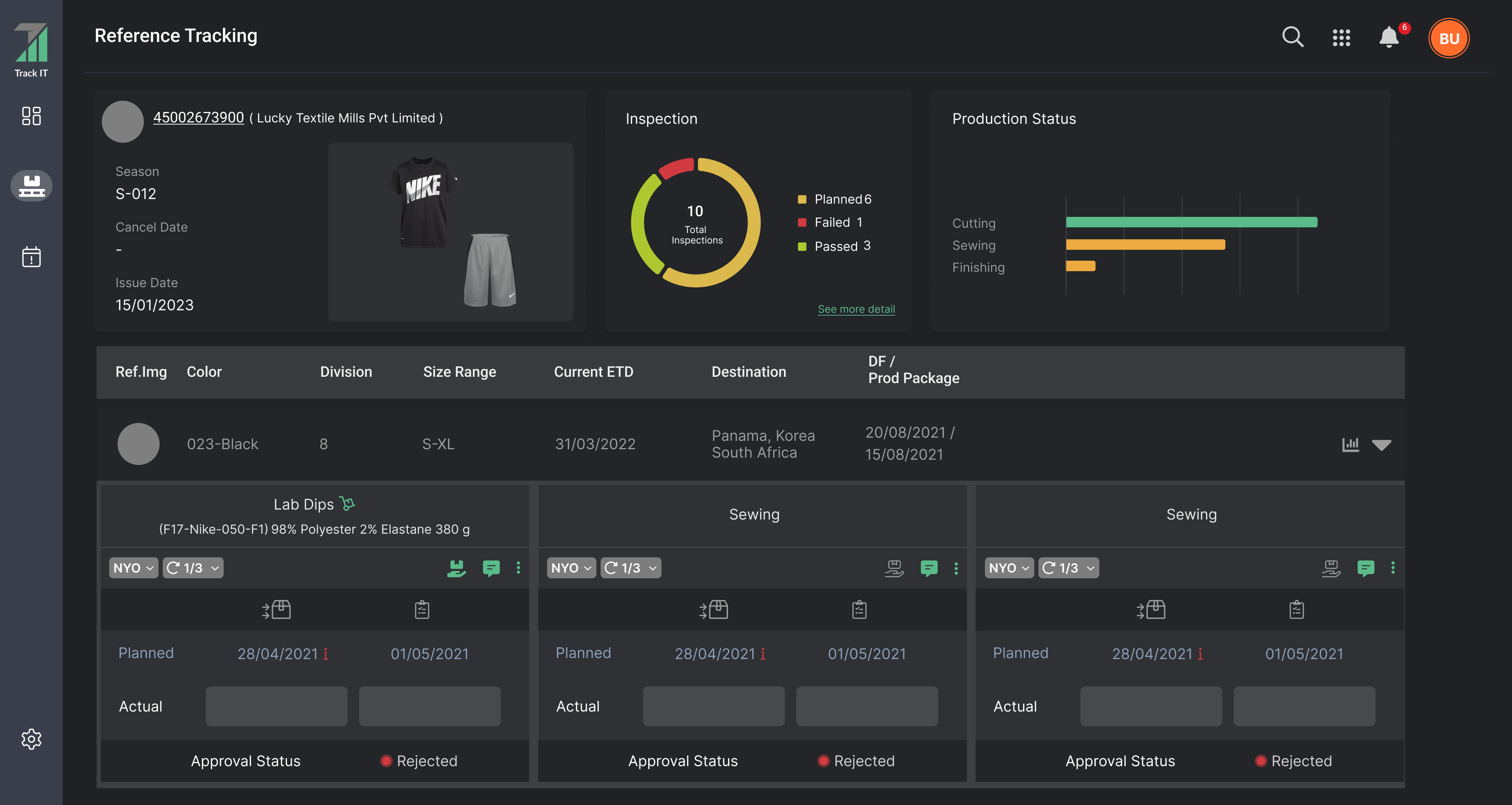
TrackIT production tracking overview
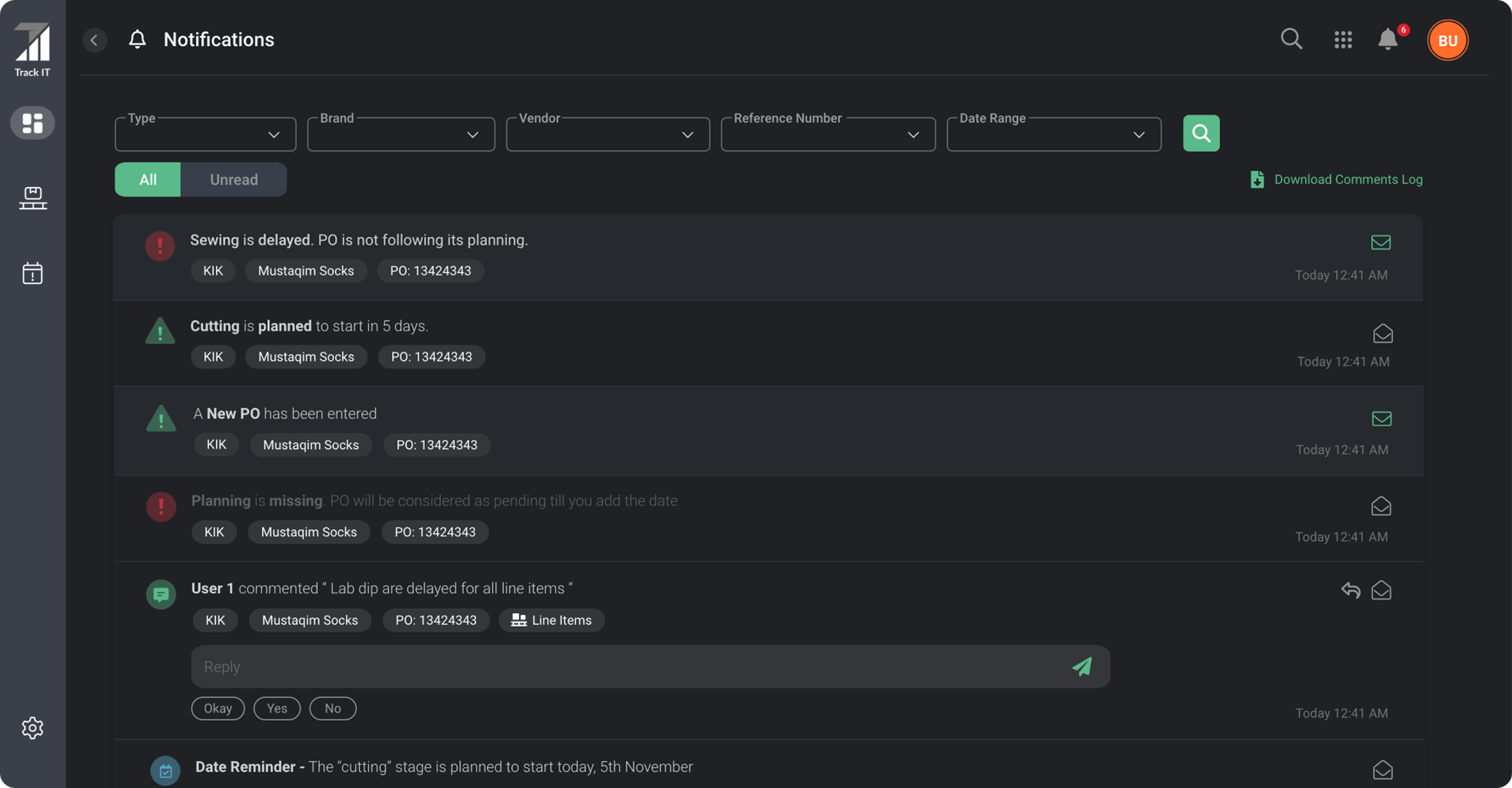
TrackIT actionable notification center

At a glance

The short version.

01

Challenge

Production status lived across spreadsheets, messages, and calls, leaving teams without a dependable shared picture.

02

My contribution

I created TrackIT from scratch: contextual inquiry, interviews, field studies, and focus groups informed the information architecture, prototypes, and usability testing.

03

Outcome

$90K annual revenue impact and 60% adoption growth through clearer milestones, approvals, and risk signals.

01 / The starting point

Understanding the problem.

Purchase-order context was scattered across spreadsheets, email, and calls. Merchants, vendors, brands, and supervisors lacked a shared view of milestones, delays, approvals, and production risk.

contextual inquiryuser interviewsfield studiesusability testing
The experience I designed for
  1. Set up the order

    Connect items, stages, and dates.

  2. See shared progress

    Track approvals and production.

  3. Spot the exception

    Find delays and coordinate a response.

02 / Research + system model

Research shaped the product from the ground up.

I created TrackIT from scratch, beginning with the people and processes behind textile procurement.Through contextual inquiry, user interviews, field studies, and focus groups, I investigated how factory teams, merchandisers, buyers, and supervisors coordinated work. The recurring problems—lost information, difficult collaboration, limited order visibility, and no shared source of truth—became the foundation for the product.

Contextual inquiry + field studies

I observed work in its everyday setting and asked people to explain their tasks, handoffs, and decisions. Seeing how spreadsheets, messages, and calls were used together revealed context that a screen requirement alone could not capture.

User interviews + focus groups

Interviews explored individual responsibilities and pain points. Recurring focus groups brought different perspectives together to discuss requirements and proposed solutions across the procurement workflow.

Research synthesis + information architecture

I translated the findings into user flows, an information architecture, and wireframes. The model connected purchase orders, reference items, stages, offices, dates, and approvals before those relationships became interface components.

Usability testing in context

Testing and iteration brought the designs back to users. Contextual inquiry helped connect feedback to how people actually worked: what they needed to understand, what they needed to enter, and what other stakeholders needed to see.
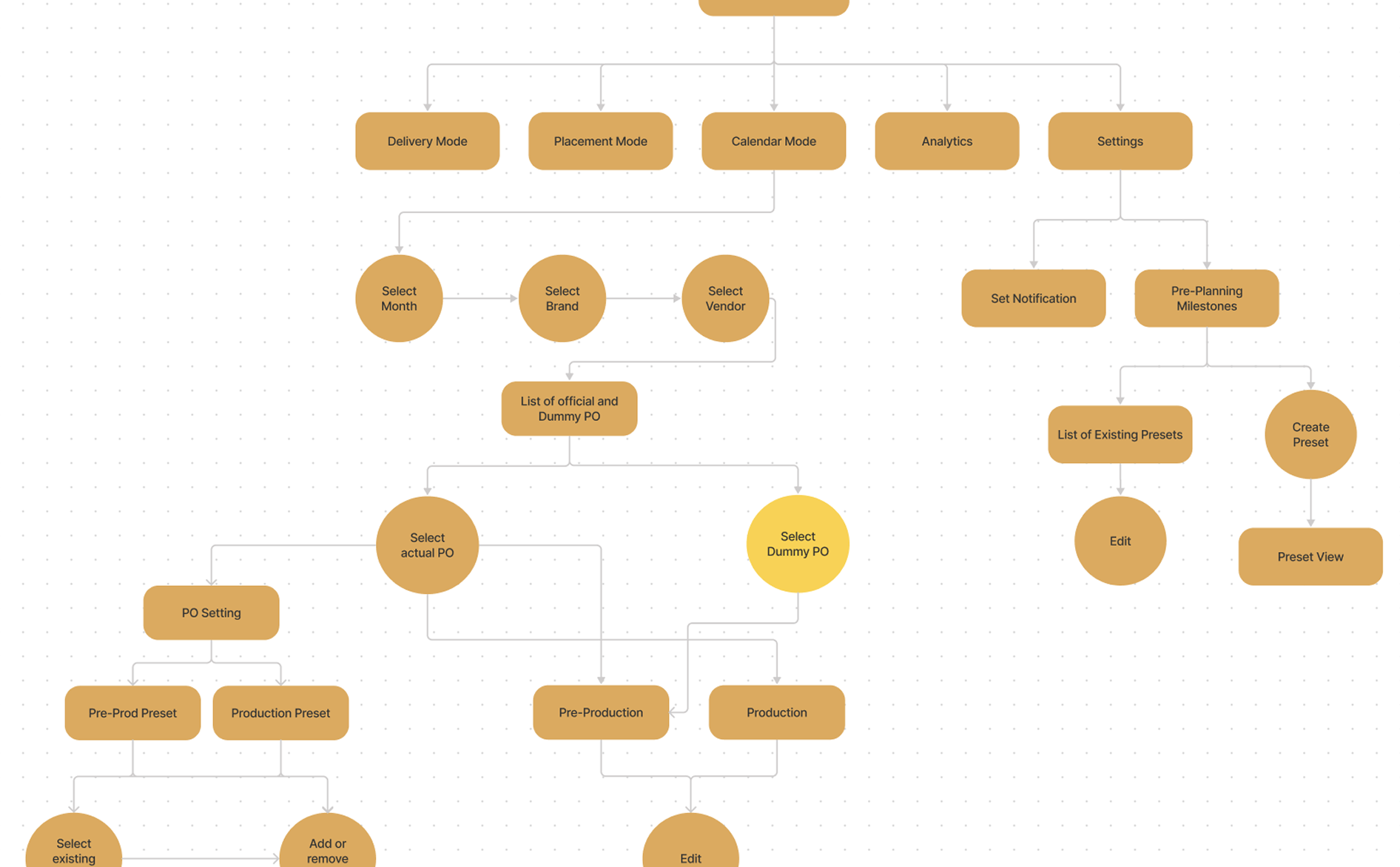
Early TrackIT workflow map covering delivery, placement, calendar, analytics, settings, and purchase-order planning
The first map followed how people moved through planning and daily tracking.
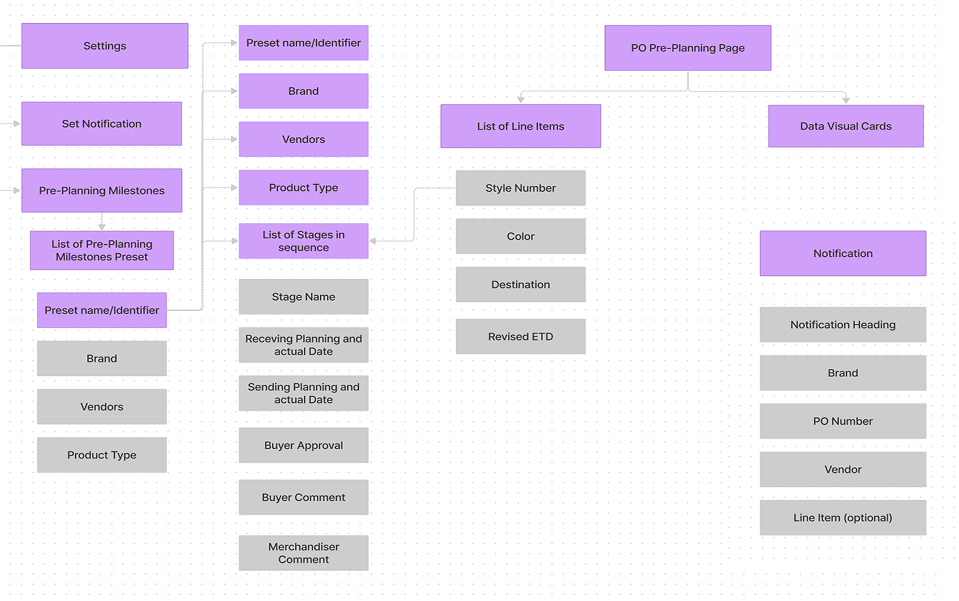
Refined TrackIT system map connecting presets, purchase-order line items, milestones, and notifications
The system model separated reusable setup from time-sensitive production work.

03 / Individual purchase order

Build shared visibility one purchase order at a time.

The individual PO is where the shared picture begins.Merchandisers build the record here: planned and actual dates, stage iterations, approving offices, comments, and outcomes. Those updates give them a clear view of the order and create visibility for other stakeholders through the PO listing and dashboard.
TrackIT production tracking screen with garment details, inspection results, production status, and milestones

Whole screen

The whole workflow.

The stage model keeps ownership, iteration, schedule, and approval connected.
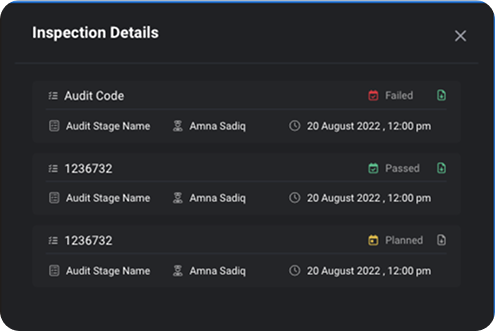
Inspection detail panel showing failed, passed, and planned audits
Inspection history preserves audit status, owner, time, and supporting files.
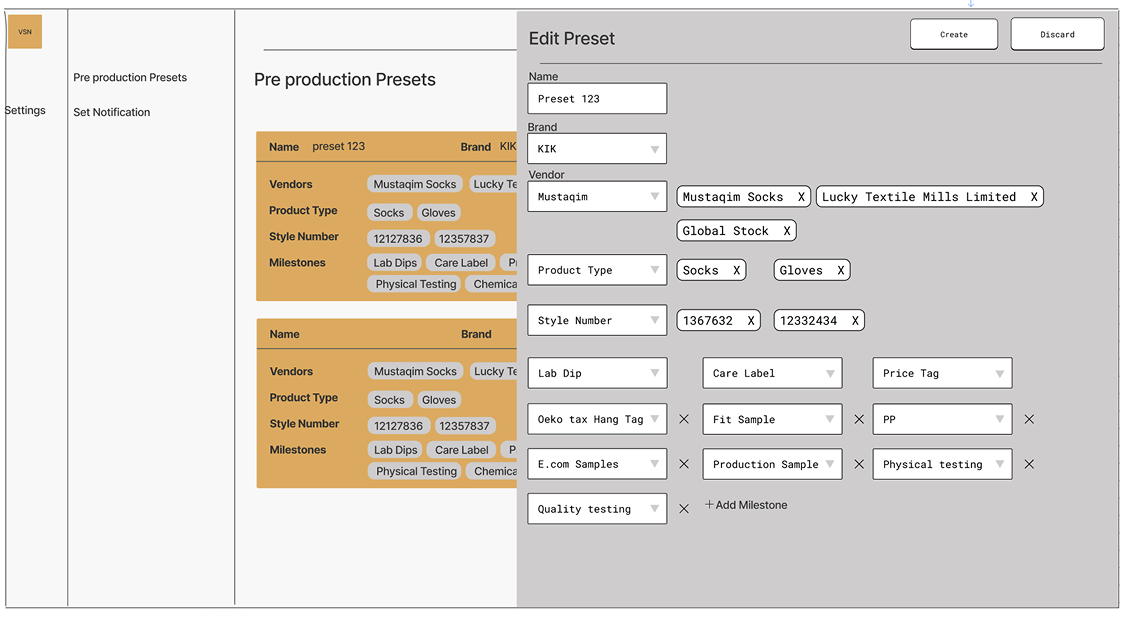
Wireframe for reusable pre-production milestone presets
Reusable presets prevent teams from configuring the same milestone sequence order by order.

04 / Purchase orders

Make production milestones easy to scan.

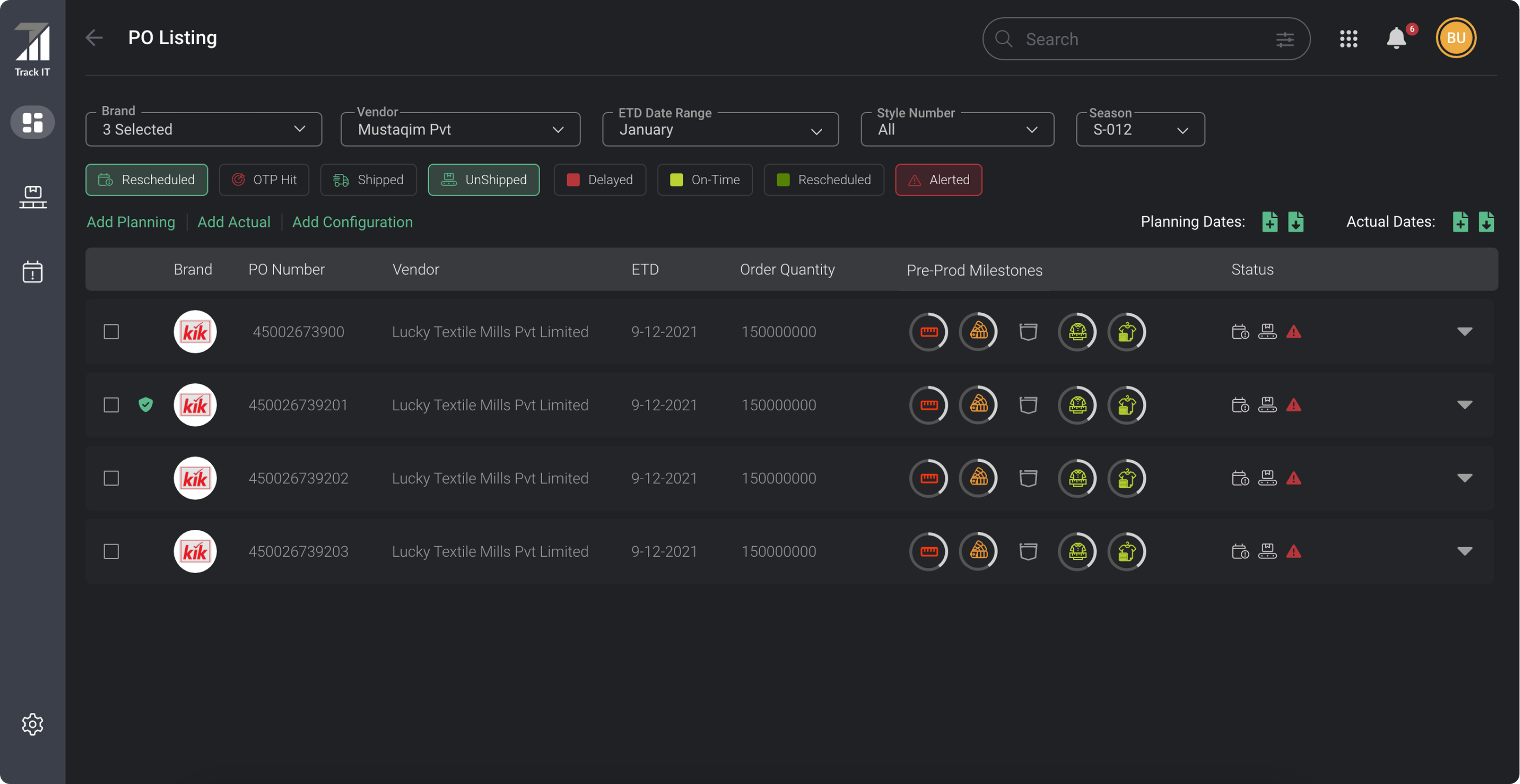
Individual PO updates become a view across orders.Teams can filter by brand, vendor, date, style, and season; compare pre-production milestones; and add planning, actual dates, or configuration in context.
TrackIT purchase-order listing with filters, status categories, and milestone indicators

Whole screen

The whole workflow.

One list supports both finding the right orders and reading their production state.

05 / Dashboard

Put risk and approvals before everything else.

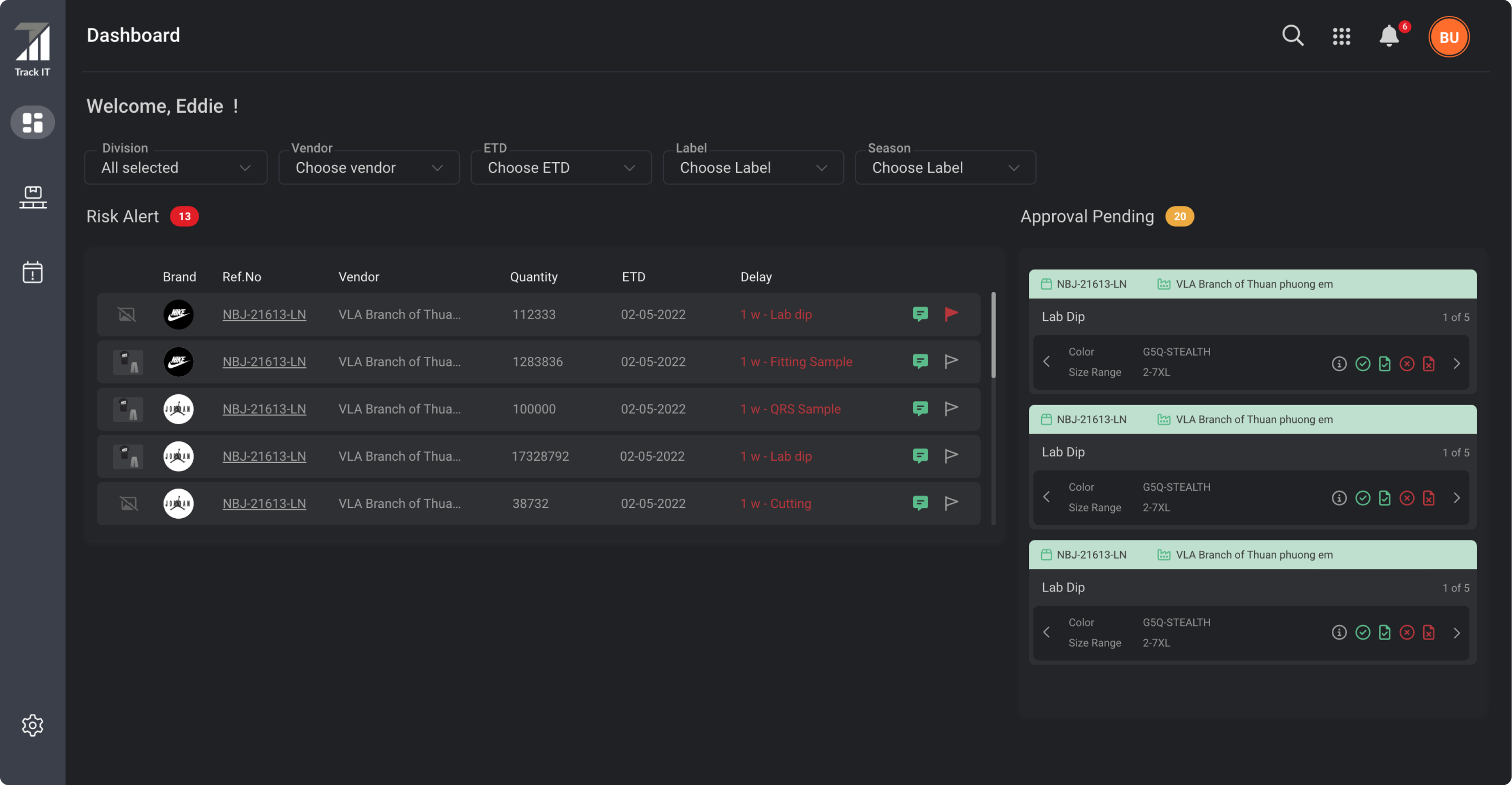
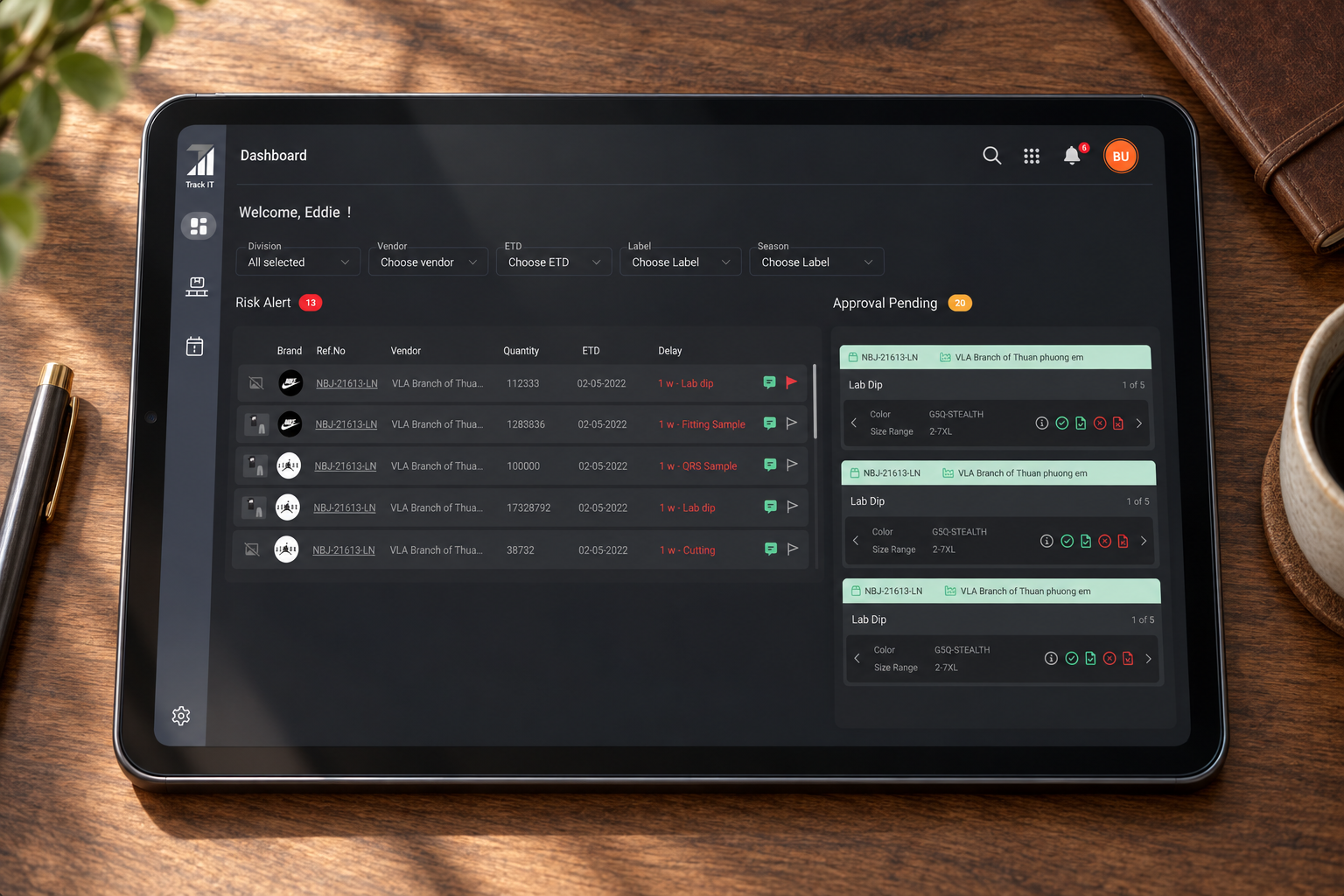
The dashboard brings the shared operational picture together.Filters narrow the operational field while two parallel surfaces answer the urgent questions: which purchase orders are at risk, and which production decisions are waiting for approval.
TrackIT dashboard showing filters, risk alerts, and approvals pending

Whole screen

The whole workflow.

Risk alerts and pending approvals share one dashboard, helping teams spot delays and make decisions in the same workspace.
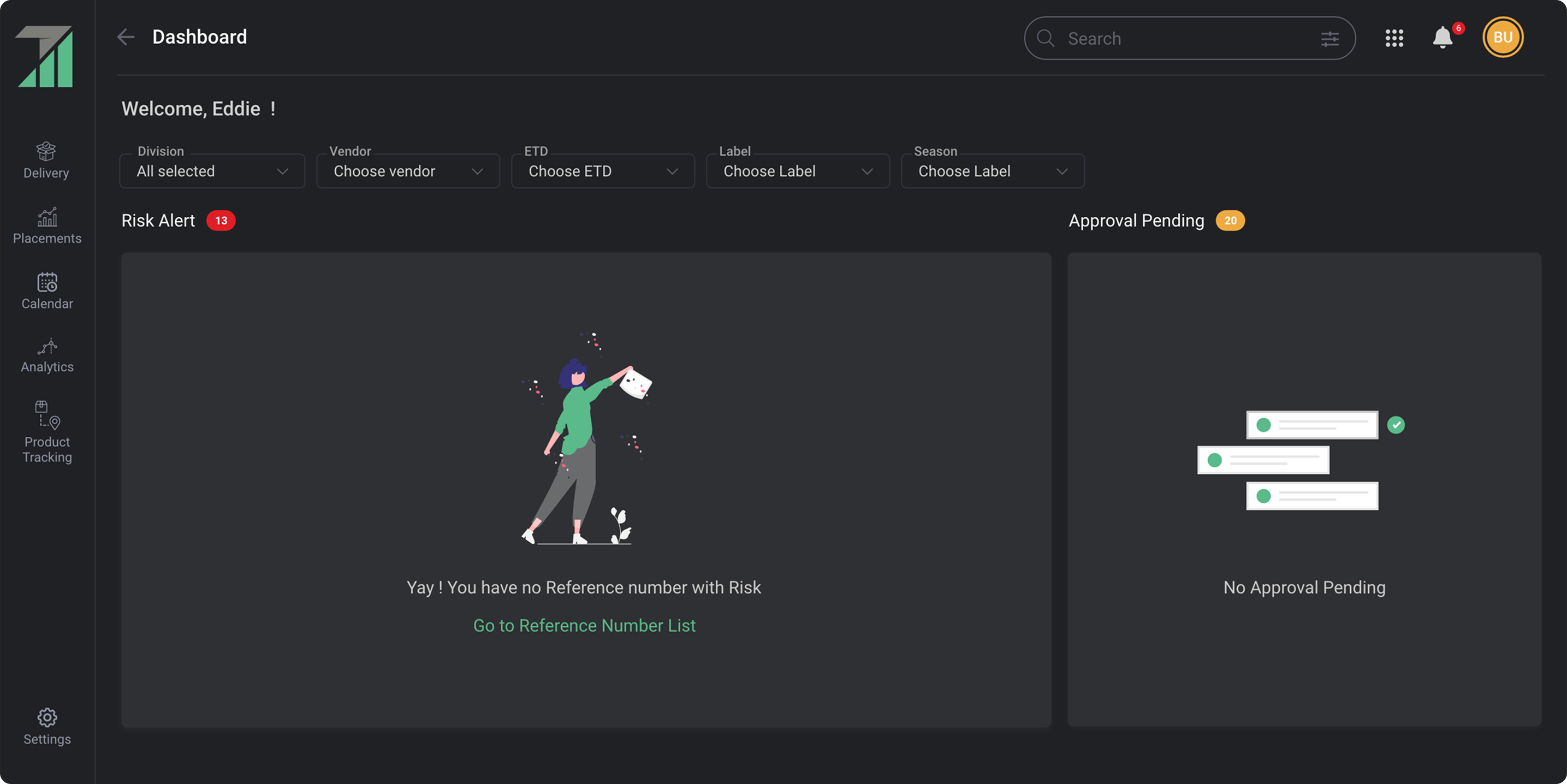
TrackIT dashboard empty states for risk alerts and approvals
Purposeful empty states confirm that work is clear and point to the next useful destination.

06 / Actionable notifications

Turn alerts into the next step.

Notifications preserve context and offer a way forward.Delays, missing plans, new POs, comments, and date reminders are filterable by operational attributes. Inline replies and actions let people resolve work instead of treating the notification list as an inbox to clear.
TrackIT notification center with filters, delays, comments, replies, and reminders

Whole screen

The whole workflow.

Notifications are designed as entry points to work, not passive messages.

07 / Bulk decisions

Reduce repetition without hiding accountability.

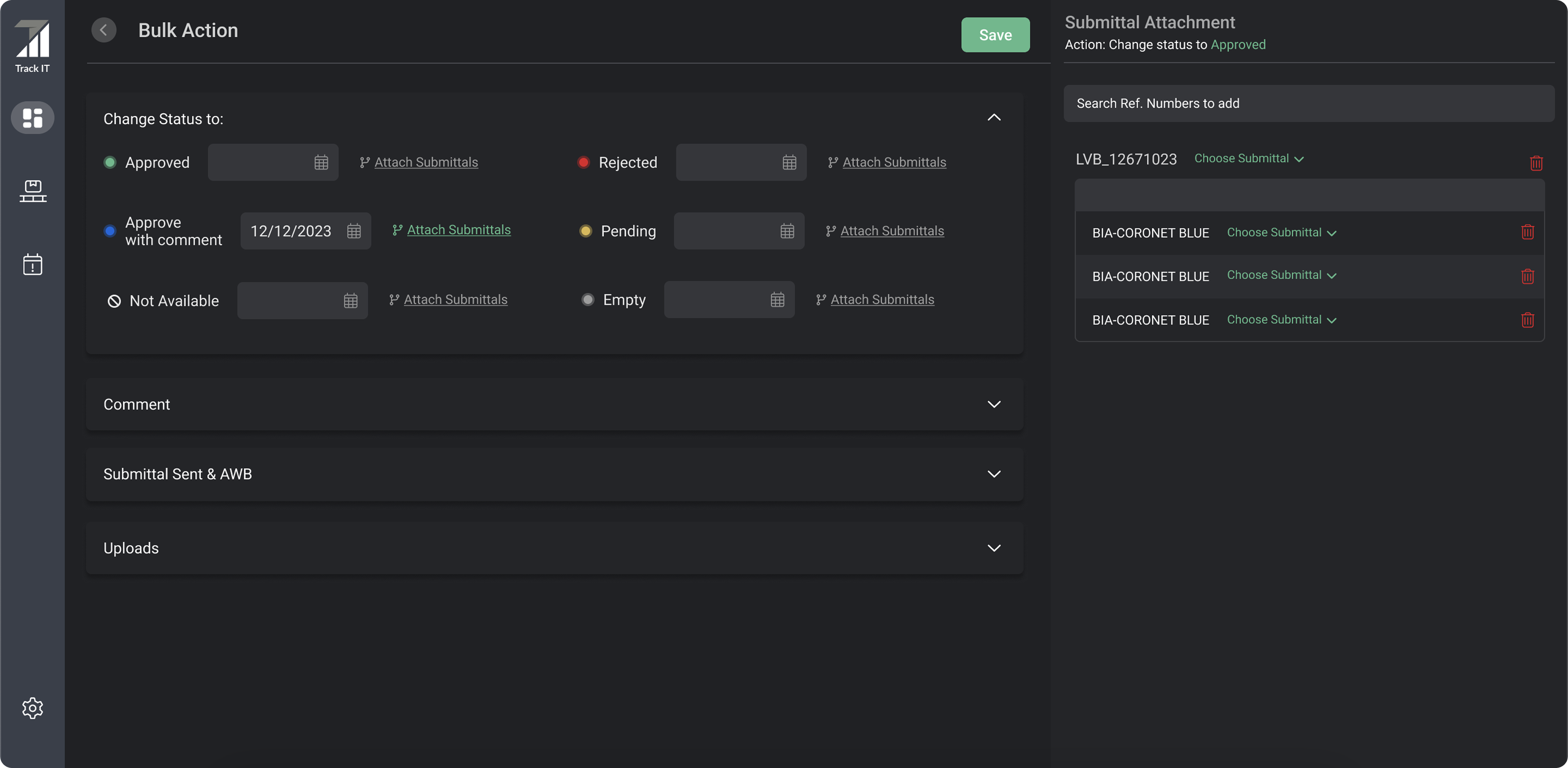
Bulk work still carries the evidence behind each decision.Users can update many line items, assign dates, add comments, upload files, and attach submittal or airway-bill references. The side panel makes the selected records explicit before anything is saved.
TrackIT bulk action workspace for statuses, dates, comments, uploads, and submittals

Whole screen

The whole workflow.

Bulk action reduces repetitive work while preserving the records affected by the change.
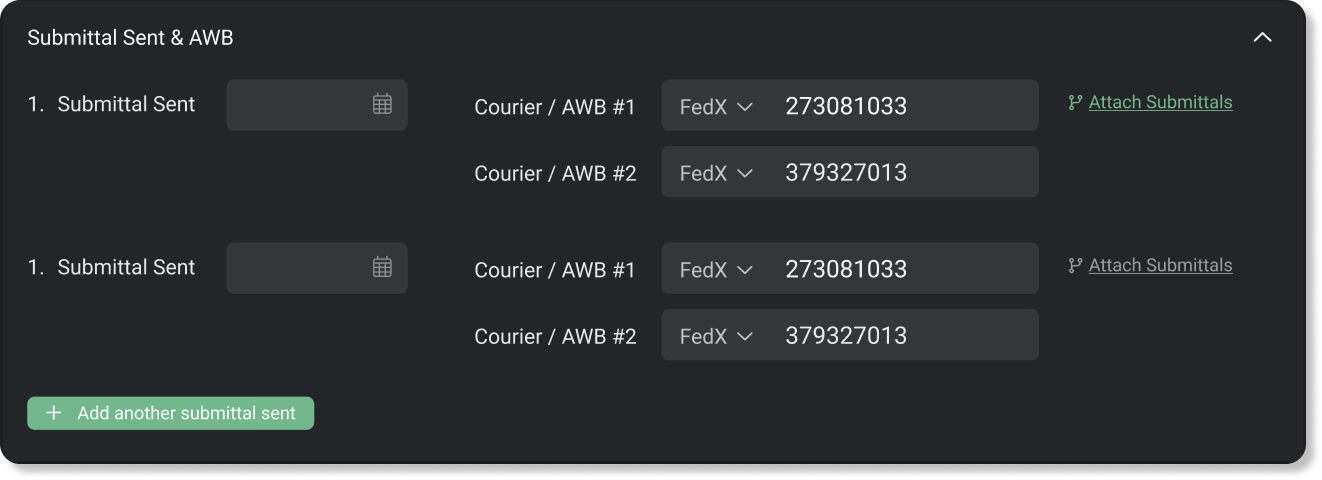
Submittal sent and airway-bill fields with attachment actions
Multiple shipments and courier references stay attached to the relevant production record.
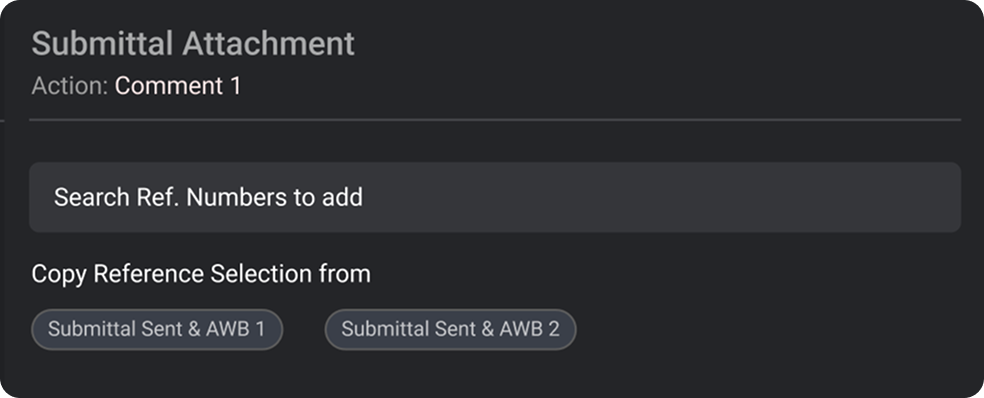
Submittal attachment panel for searching or copying reference selections
Users can search references or reuse a prior selection instead of rebuilding it.

One selection, fewer repeated steps.

This walkthrough follows submittal attachments and reference selection, then shows how a selection can be reused for comments. Merchandisers keep the affected records in view while handling related updates together.

This recording has no audio. In the walkthrough:

  1. Open the bulk-action workspace and choose the records to update.
  2. Attach submittals and select references in the side panel, keeping the affected line items visible.
  3. Reuse the reference selection when adding comments, instead of selecting each item again.

Keep exploring · 05

Expanded Program on ImmunizationBack to all projectsSay hello